RDP Status Check Online – FLISP, HSSOnline Subsidy Portal 2026
Everything your RDP status result means, what to do next, and where to get help if your application is stuck.
Enter your 13-digit South African ID number to check your HSS application status.
If you have already applied for an RDP house, the next step is to confirm where your application stands. This guide explains the RDP status check online process in simple words, including how HSSOnline works, what details you need, what common status messages mean, and how Gauteng applicants can follow up. You will also learn what to do if your record does not appear and how to avoid unsafe websites or people asking for money.
What Is RDP Housing?
RDP stands for the Reconstruction and Development Programme, the government initiative launched after 1994 to provide free, subsidised houses to low-income South African households. The programme now runs under the Breaking New Ground (BNG) policy, which shifted the focus from basic structures to integrated settlements with water, electricity, roads, and transport links included. Both terms are used interchangeably.
Two systems sit behind every RDP application:
National Housing Needs Register: where your need for housing is recorded. Provinces draw beneficiaries from this pool when a project opens in your area.
Housing Subsidy System: manages your actual application: captures details, runs background checks, sends for approval, and tracks construction. An online status check queries this system, which is why the portal is called HSSOnline.
How to Check Your RDP Housing Subsidy Status Online
There are multiple official ways to check your RDP status both online and offline but the easiest is via the national Housing Subsidy Portal (HSS).
Check via HSS Online Status Check
Here’s how to do an HSSonline status check online (also works for RDP status check online):
1. Visit HHS Portal
Go to official HHS Portal https://www.hssonline.gov.za/ or trusted site like
https://rdpstatus.co.za/
2. Enter ID Number
Type your 13-digit South African ID number exactly as it appears on your green ID book or smart card
3. Submit the Search
Click the search or submit button. No account registration or one-time PIN is needed for this basic RDP status check.
4. Read Your Result
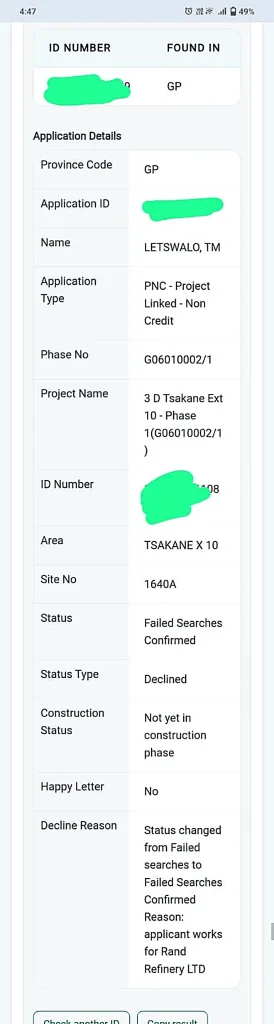
If a record is found, you’ll see your application ID and current status, and in some versions, province, project name, and area.
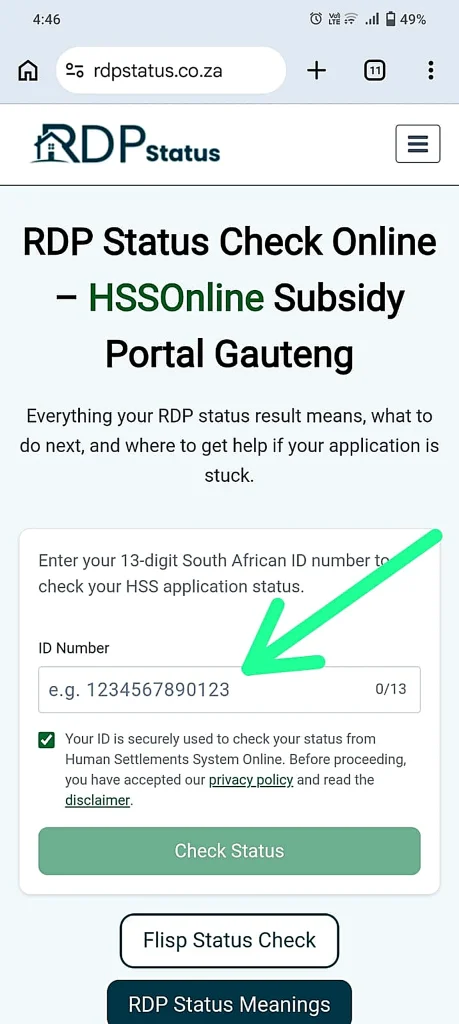
 Step1: Visit site
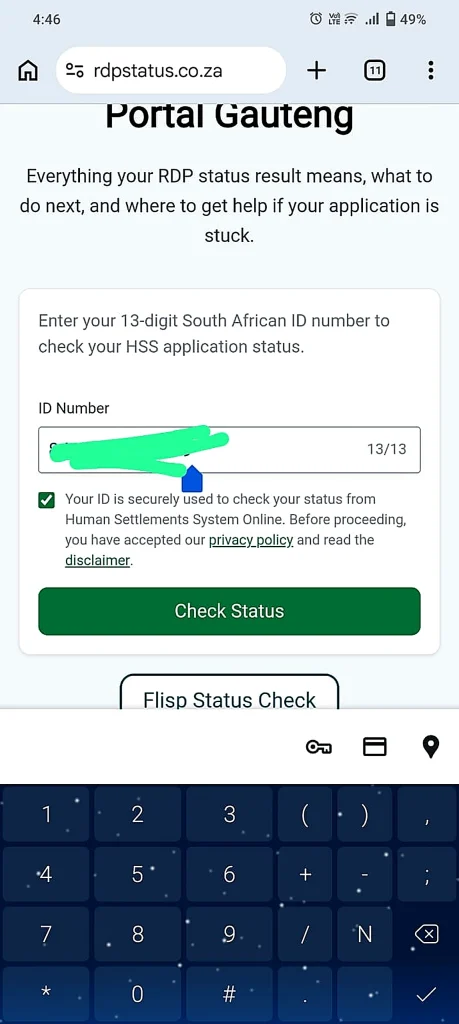
- Step 2: Add id number and click on check status
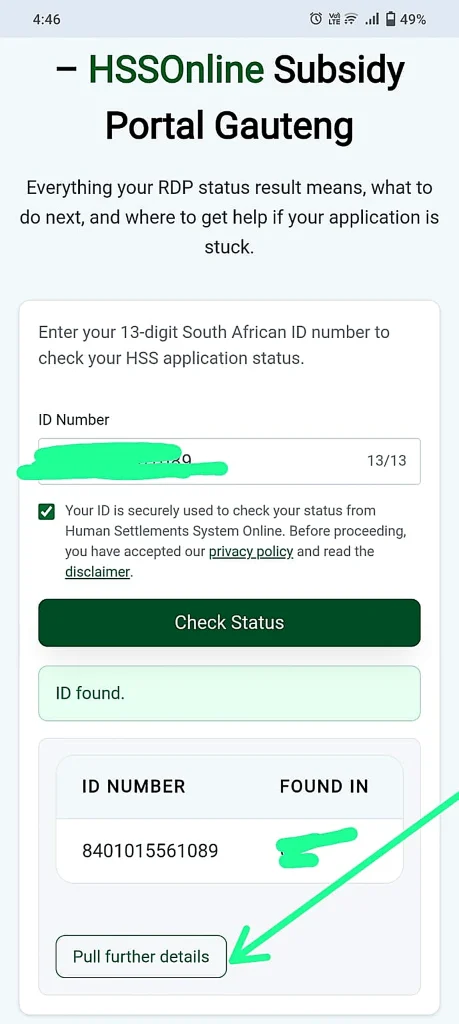
- Step 3: ID number is found, Search and pull further details
- Step 4: Read your results
Alternative Ways to Check Your RDP Housing Status
If online status check is not possible, South Africans can also use the following real alternatives:
By SMS
Send your 13‑digit ID number and your surname to: 44108. You will receive an automated status message.
By Phone
Call the Department of Human Settlements toll‑free number: 0800 146 873. Officials can give you a current status and explain any delays.
In Person
Visit the housing office where you first applied. Bring your ID document and any reference numbers. Officials can access your application and explain your current status.
By Local Municipality
Visit nearby office where you applied. Municipal staff can look up your record manually, useful if your application predates the online system or your details have changed since you applied.
By Email
Email your ID number and query to your local housing office’s enquiries address.
By Online Portal
Check your status through this website https://rdpstatus.co.za/ by using your id number
What You Need Before Checking
Before checking your RDP house status, keep these details ready:
For many applicants, the ID number is enough for a housing subsidy status check online. Extra documents help if manual checking is needed.
What Your RDP Status Actually Means
Once you have a result, the hard part is knowing what it means. Here’s your status grouped by stage, with what to do about it.
Processing
Your file is being checked
Nothing to do here except check back periodically. These results simply mean your file is moving through the system.
| What your status suggests | Plain meaning | What to do |
|---|---|---|
| Captured / verified | Your details are on the system and confirmed correct | Nothing, check back in a few weeks |
| Sent for initial checks | Your file has gone for a first round of background checks | Wait, this is routine |
| Passed initial checks | You cleared the first round and moved forward | Wait |
| Sent for further checks | A more detailed background search is underway | Wait |
| Passed further checks | You’re through the detailed search and now in processing | Wait |
| Sent to the Provincial Housing Board | Your file is with the board that approves applications | Wait, this stage can take time |
| Selected for approval | You’ve been picked out and are next in line | Wait |
| Validated but paused | Your file is correct but has been put on hold temporarily | Follow up if it’s been more than a few months |
Approved
You’ve been approved
Approval and getting an actual house are two different milestones. Don’t assume approval means a house is imminent.
| What your status suggests | Plain meaning | What to do |
|---|---|---|
| Approved | A subsidy has been approved against your name | Ask your local office about the next project timeline |
| Approved, not yet allocated | You qualify, but no specific house is matched to you yet | This is common, keep checking every few months |
| Approved, processing paused | Your approval is genuine, but your benefit is on hold | Visit your office to ask why |
| Imported, construction complete | Your record moved from an older system and shows a completed build | Confirm this is accurate at your office |
| Approved, later reversed | A watchdog body (the SIU) found an issue and reversed the approval | Visit your office immediately for an explanation |
Declined
Declined, and what it means
A decline always comes with a reason. Some are fixable, some aren’t. Here’s the difference.
| What your status suggests | Plain meaning | Can it usually be fixed? |
|---|---|---|
| Budget for this round used up | The province’s allocated funds for that round are exhausted | Yes, often reconsidered in the next funding round |
| Not a recorded citizen or resident | Your citizenship or residency status wasn’t confirmed | Sometimes, bring updated documents |
| Single with no dependants | The subsidy category needs a partner or dependants on file | Only if your household details actually change |
| Household income too high | Your combined income is above the qualifying limit | No, unless your income has genuinely changed |
| Procedural or document error | A step was done incorrectly or paperwork is missing | Yes, this is one of the most common and fixable reasons |
| Declined by the Provincial Housing Board | The board reviewed and declined your file directly | Rarely, ask for the specific reason in writing |
| Withdrawn by you | You or someone on your behalf cancelled the application | You’d need to reapply |
| Linked to another property already | The system shows you already have a property on record | Only if this is a data error, dispute it with proof |
| Duplicate ID on file | Your ID appears on more than one application | Yes, this usually needs manual correction at your office |
| ID details don’t match records | Your ID, or your spouse’s ID, doesn’t match official records | Yes, bring your original ID document to correct it |
| Failed a deeds search | Records show you own, or owned, property before | No, this is based on verified Deeds Office records |
| Failed a national database check | Records show you’ve had a housing subsidy before | No, this is based on verified national records |
| Under the required age | You don’t meet the age requirement for that subsidy type | No, unless applying under a different category |
| Applicant recorded as deceased | The system has the applicant marked as deceased | Yes, this is an error that needs urgent correction |
On hold
Paused or under review
Not approved or declined, a person needs to look at the file next.
| What your status suggests | Plain meaning | What to do |
|---|---|---|
| Flagged, under review | A search raised a possible issue and it’s being checked before a final decision | Follow up, ask what triggered the flag |
| Reconsideration requested | Someone asked for a failed result to be reviewed again | Wait for the review outcome |
| Failed result confirmed | The flagged issue was checked and confirmed as accurate | Ask your office what your options are now |
| On hold after a decline | Declined, then paused rather than closed | Visit in person, this often needs a manual push |
| Suspended | Your file has been paused entirely | Visit in person to find out why |
| Approval cancelled at national level | An earlier approval was reversed centrally | Visit your office immediately |
| Reset to registered | Your file was reset back to a plain registered state | Confirm your original documents are still on file |
| Locked, transferred across departments | Your project moved to a cross-border department | Contact the new department directly |
| Moved to the National Housing Needs Register | Your file was shifted off HSS onto the NHNR | This is a normal part of the registration process |
| Unclear or unknown | The system couldn’t determine a clear status | Visit in person, this needs a manual check |
What Does “In Allocation” Mean in RDP Status?
“In allocation” means your file is with the provincial Allocation Committee, the group deciding who receives a house in a project that’s ready right now. It’s further along than simply being registered, but still isn’t a guarantee.
Registered means you’re in the NHNR (National Housing Needs Register) pool for your area.
In allocation means a committee is actively deciding beneficiaries for an available project.
Approved and Allocated are separate milestones, approval confirms you qualify, allocation confirms an actual house has been matched to you.
Who Qualifies for an RDP House?
To qualify for a fully subsidised government house, applicants must meet specific rules. The Department of Human Settlements lists key requirements, including being a South African citizen, being a first-time homeowner, not having received a government housing subsidy before, and meeting the household income requirement.
You may generally need to meet these conditions:
South African Citizen
Must be a South African citizen or qualifying permanent resident with a valid ID document.
Age Requirement
Must be 18 or older and legally able to sign a contract. Some categories require 21+.
Household Composition
Must be married, cohabiting, or single with financial dependants (children or dependants in your care).
Income Threshold
Household income must be below the qualifying threshold, commonly cited as R3,500 or less per month.
No Prior Subsidy
Must never have received a government housing subsidy before in any form.
No Prior Property
Must never have owned residential property before (a clean Deeds Office record).
Documents Needed for RDP Housing
When applying for or following up on an RDP housing application, you may need to provide basic documents. Ekurhuleni lists documents such as the applicant and spouse’s identity documents, certified copies of children’s birth certificates, and proof of income if working.
Keep these documents ready:
Identity Document
Your green ID book or smart card, and spouse’s if applicable.
Children’s Birth Certificates
Certified copies for all dependant children.
Proof of Income
Payslip if employed, or a statutory declaration if unemployed.
Form C
If following up on an existing application, the confirmation slip from your original application.
Proof of Address
Current contact details and residential address.
Getting Help When Your Local Office Can’t Resolve It
Step 1.
Start at your housing office
Begin at the housing office where you originally applied. Bring your ID, Form C, and any correspondence.
Step 2.
Contact the MEC for Human Settlements
Contact the MEC for Human Settlements
Step 3.
Ombudsman for Human Settlements
If still not helped, lodge a formal complaint with the Ombudsman for Human Settlements.
Step 4.
Free Legal Help
Two organisations offer free legal assistance, Black Sash and ProBono.Org. See contacts below.
| Province | Contact |
|---|---|
| Gauteng | 011 355 4000 |
| Western Cape | 079 769 1207 |
| Eastern Cape | 043 711 9901 |
| KwaZulu-Natal | 033 392 6400 |
| North West | 018 388 5403 |
| Limpopo | 015 284 5000 |
| Northern Cape | 053 830 9422 |
| Free State | 051 405 3883 |
| Mpumalanga | 013 766 6087 |
Free Legal Assistance
RDP Status Check Online Gauteng
If you are in Gauteng, use RDP status check online through HSSOnline first, then contact your local municipal housing office if the result is missing or confusing.
You may need direct help if:
For department of housing Gauteng RDP status check, keep your ID document and proof of application ready.
Common RDP Status Messages
When checking your status online, you may see a short message. Below are common meanings.
Received
This usually means the application has been captured or received on the system. It does not mean a house is ready.
Sent for Searches
This means your details may be checked against official records to confirm whether you already received a subsidy before.
Failed Searches
This can mean the system found a possible issue, such as previous subsidy benefits, property ownership, incorrect details, or a database mismatch.
Declined
This means the application did not meet a required step or there may be a problem with the information provided. Ask the office where you applied for the exact reason.
Approved
Approved is a positive sign, but it does not always mean immediate allocation. You may still need to wait for project availability or final confirmation.
In Allocation
In allocation usually means the application may be moving toward beneficiary selection, placement, or project allocation. It does not always mean the house is ready.
Why Your RDP Status Is Not Showing
Sometimes your housing subsidy status may not appear online. Common reasons include:
Do not assume your application is cancelled only because it does not show online. The best step is to visit the office where you applied.
What to Do If Your Status Is Missing or Unclear
If your RDP status is missing, take your documents and follow up directly.
You can:
This is important if you applied years ago and your contact details changed.
RDP Waiting List and Allocation Updates
The housing subsidy portal can help you confirm whether a subsidy record exists, but it may not always show your exact waiting list position.
Waiting time can depend on:
For RDP housing waiting list check Gauteng, contact the local housing office for the most accurate update.
How to Check Your FLISP / First Home Finance Status Online
FLISP, now officially called First Home Finance, is a South African government housing subsidy that helps eligible first-time home buyers purchase or build a home. Instead of providing a free house like the RDP programme, it offers a once-off financial subsidy earning R3,501 to R22,000 per month buy or build a first home. Many people still refer to the programme by its former name, FLISP.
Unlike an RDP status check, a First Home Finance check has three different paths depending on what you’re actually trying to find out. Use whichever matches where you are in the process.
Option 1:
Just checking if you’ve ever benefited from a government housing subsidy before No registration needed.
- Go to fhf.nhfc.co.za
- Click “Check Eligibility”
- Enter your ID number
- The system tells you whether you’ve previously benefited from any government housing subsidy scheme, from any sphere of government
This is a useful check even if you’re only applying for RDP, since a prior subsidy benefit can also affect your RDP eligibility.
Option 2:
Checking your Pre-Approval outcome This applies if you’ve already registered and applied for pre-approval.
- Go to fhf.nhfc.co.za and Register, if you haven’t already
- Log in and enter the One-Time PIN (OTP) sent to your phone
- Click “Apply for Pre-approval” (if you haven’t yet), accept the disclaimer, and capture your details
- The next day, log back in, repeat the login and OTP steps, and your Pre-approval outcome will show as Approved or Declined, along with an indication of how much you may qualify for
Option 3:
Checking a Full Application status This applies once you’ve gone beyond pre-approval and submitted a complete application with supporting documents.
- Log in to fhf.nhfc.co.za with your registered details and OTP
- Navigate to your application dashboard
- Your status will reflect where your full application sits, for example still under document verification, forwarded to the Provincial Department for a resolution number, or finalised
A note on the login requirement: this OTP and registration step is a genuine, necessary part of checking a Pre-Approval or Full Application status on First Home Finance. It is not the same as the plain RDP/HSS status check in Section 2 of this guide, which needs only your ID number. Don’t confuse the two, since guides that mix them up are where the “do I need an OTP for RDP” confusion usually comes from.
What you’ll need on hand for a Full Application check or follow-up:
- Your ID number and the email/cellphone number you registered with
- Your bank’s home loan approval or Permission to Occupy letter reference, if you have one
- Your application reference or resolution number, once you have one, for any follow-up query
If your First Home Finance status is stuck or unclear:
- Enquiries: firsthomefinanceenquiries@nhfc.co.za
- Complaints: firsthomefinancecomplaints@nhfc.co.za
- General NHFC line: 011 644 9800
Worth knowing either way: under the National Housing Code, Part 3, Section 7.11, no lender or partner may charge you an administration fee specifically for a First Home Finance application. Report anyone who tries to the NHFC directly using the complaints address above.
FLISP and First Home Finance VS RDP
| Point | RDP Housing | FLISP / First Home Finance |
|---|---|---|
| Purpose | Government-subsidised house | Subsidy to help buy/build a home |
| Best for | Very low-income households | First-time home buyers with some income |
| Income group | Usually below R3,500/month | R3,501–R22,000/month |
| Support type | House allocation | Once-off financial subsidy |
| Apply through | Municipality / Human Settlements | First Home Finance / NHFC route |
| Status check | HSSOnline or housing office | First Home Finance / FLISP portal |
| Waiting list | Yes, usually linked to housing demand list | No normal RDP-style waiting list |
| Same or different? | Different from FLISP | Different from RDP |
Safety Tips for Applicants
Be careful when checking your details online or following up with anyone.
Remember:
Government housing applications should go through municipalities and provincial housing departments.
FAQs
RDP status check online is a useful first step for applicants who want to confirm their housing subsidy record. It can show whether your application appears on the system and may give a short status update.
If the result is missing, unclear, or linked to waiting list questions, visit the housing office where you applied. Keep your ID document ready, update your contact details, and use only official channels when checking your RDP housing status.